Introduction
I started my mobile apps "development career" last year by publishing a couple of tools for the Windows Mobile 6.5 platform. I quickly grew fond of the whole apps concept - low threshold for getting started and small programs meaning short projects time-wise. Also the platform took care of the distribution and monetary transactions for me, so that I could care about the thing I find most fun - coding.It didn't take very long until I realized I had to start thinking about other platforms, though. The Windows Mobile 6.x platform (WM6.x for short) was already lagging behind Apple and Google user experience-wise, and the nail in the coffin came when Microsoft announced Windows Phone 7. Everyone who've done their research know that the Windows Mobile 6.x platform is as different to Windows Phone 7 as Android is to iOS, so although I was already into Microsoft technology, I knew the choice for my next mobile operating system was anything but given. I had already ruled out Apple iOS for several reasons not relevant here, so my choice was between the rising star of Android from Google, and Microsoft's new undertaking in the cell phone world - Windows Phone 7 (WP7).
Microsoft seemed very serious about their new venture. High-ranking Microsoft-guys were preaching the awesomeness of the new platform on conventions and in media all over the world. It seemed like they put a lot of resources into developing the framework and the IDE. At the same time the developers on the WM6.x like me, were given extra attention and information and after a while even offered to get a physical WP7 phone before the official release. It seemed like the path of least resistance to move over to WP7, even though I had to learn Silverlight, but at the same time my friend had bought a HTC Hero phone. Which I found quite cool.
The Android platform, which HTC seemed to embrace here in Scandinavia, was quickly growing in popularity. iPhone had been the sole market leader for a couple of years and I think the public wanted something new and fresh. Android could seem to be exactly that. They had the sleek look and feel of the iPhone, while taking the technology a step further, which entices us geeks. I was beginning to suspect that this over time could be the new market leader or at least compete with the iPhone. I had done a bit of Java programming at the University, so I wasn't afraid to try that again, although I knew I had to read up on the framework.
The technology wasn't a big factor in the decision I had to take. First and foremost I wanted to make money. Most money with least effort - that was basically my goal (isn't everyone's?). Technology is of course a factor when it comes to effort, but most important was which phone was most attractive to the public, hence giving me the largest market. This was of course not possible to say when WP7 wasn't even in the stores yet. I could only assume that Android would have the market lead for at least half a year after the launch of WP7, if not longer (or forever). But money wasn't all - it needs to be fun as well. I'm doing this on my spare time, and if it's not fun, I won't do it. Could WP7 make up for the lack of market share with the fun factor in the development process?
This leads me to the topic of this blog. I decided to do a test. I mean, you can't know which chocolate tastes best before you've tried both, right? (You may quote me on that). For the test to be fair, I decided to make the exact same application on both platforms, and see where it got me. The application had to be simple so that I could do it in a short period of time, but not so simple that it didn't put the framework and IDE to a test. I was going to note down my experiences during the process and write about the result here. I decided this some time in September, and the 20th of November I released the app on the second platform, completing my project.
The App
I decided to go for a simple game I had seen the likes of at the iPhone platform and also on Android: A flag and country quiz. It would require some graphics, some business logic and probably some storage. Enough for a basic test, but far from a thorough. I would not be leveraging any of the more advanced hardware or even a network connection or sound device, but I wanted to be done in a couple of months - and I had to learn not one, but two new frameworks. But most important - the complexity of the programming (or lack of it) is not directly relevant to sales numbers - the prime factor I wanted to compare. This simple game should suffice, was my conclusion.A quick overview of the game, which is called "Flags and Captital Quiz" on both platform:
There are five game modes:
- Guess country name from the picture of a flag
- Guess the flag from the name of a country
- Guess the capital from the country name
- Guess the country name from the capital
- A mixed mode which alternates randomly of the four above
 |  |  |
The IDEs
This chapter describes the differences in the extended IDEs, meaning both the editor, compiler, debugger and emulators.
Android
For those of you who've never developed in Java, the preferred IDE is called Eclipse and can be downloaded for free at www.eclipse.org. In addition you'll need the Android SDK from Google which acts as a plug-in in Eclipse. It will also provide you with the Android emulator to test your software without a physical device.The installation went smooth, nothing to complain about here. Eclipse in itself is also a pretty smooth IDE. It has some semi advanced features that Visual Studio didn't have until the 2010-version, which is quite impressive. I'm thinking of things like code inspection reporting instantly of non-used variables, syntax errors and more. It also have some refactoring features but I haven't delved into these. The debugger has all the functions you'd expect, although I do have some complaints on usability here. I find inspecting variables and object hierarchies run-time easier in VS2010, but it might be that I haven't understood properly how to use it yet. But all in all the feel of Eclipse is good. It's fast and feels light-weight even though it isn't.
Where Eclipse comes short compared to Visual Studio is in designing UI. There simply is no designer in Eclipse. You need to rely on your XML skills and ability to visualize XML as UI components. Or use a tool like DroidDraw. But even the combination of Eclipse + DroidDraw falls way short of the design capabilities of VS2010 working with Silverlight projects.
Visual Studio 2010
If I would describe Visual Studio 2010 in one word, I would say huge. It's huge in all aspects: Installation process, disk footprint, runtime footprint, features, everything. But as long as you have a machine capable of hauling it, it's a dream to work with. I just had to make space for the 3 GB of disk requirement on C: before I could start (You do need 3 GB free space on C: even if you chose to install it on D:, meaning my tight fragmentation strategy of the C-partition failed).Visual Studio have basically all the same core features as Eclipse, so the coding experience itself is not much different. There is one aspect I found slightly better in the Microsoft world, and that's the phone emulator. It's better integrated in the IDE for natural reasons (Microsoft produce both the IDE and the emulator), and this results in a lightning fast and stable launch process. The first boot of the emulator takes time, but after it is up an running, I literally only wait two seconds from I've made a code change and hit F5 (debug), until it's up and running in the emulator. Not once did I face any problems running the app, while with the Android emulator I experienced increasing problems towards the end of the project with getting Eclipse to connect to the Android debugger. Frequent restarts had to be done of both Eclipse and the debugger.
Ignoring the slight problems I had with connecting the debugger to the Android emulator, the major difference between the IDEs is the designer (or the lack of in the case of Eclipse). Hard-core coders who frown upon using visual tools to do the design have no respect with me. I use whatever tool gets the job done quickest and with best result. If drag-and-drop creates code 10 times faster than I could write it, no matter how much intellisense support there is in the IDE, I use drag-and-drop. But more important than coding speed itself is how much easier it is to design. Our brain (or the right hand side of it at least), responds much quicker to concrete visual modelling than abstract representation in the form of XML or XAML. This is where the real time-saver is. You instantly see why the three Images underneath the ListBox with four icons is a good or bad idea - no need to compile and run first.
Summary
| Eclipse | Visual Studio 2010 |
|---|---|
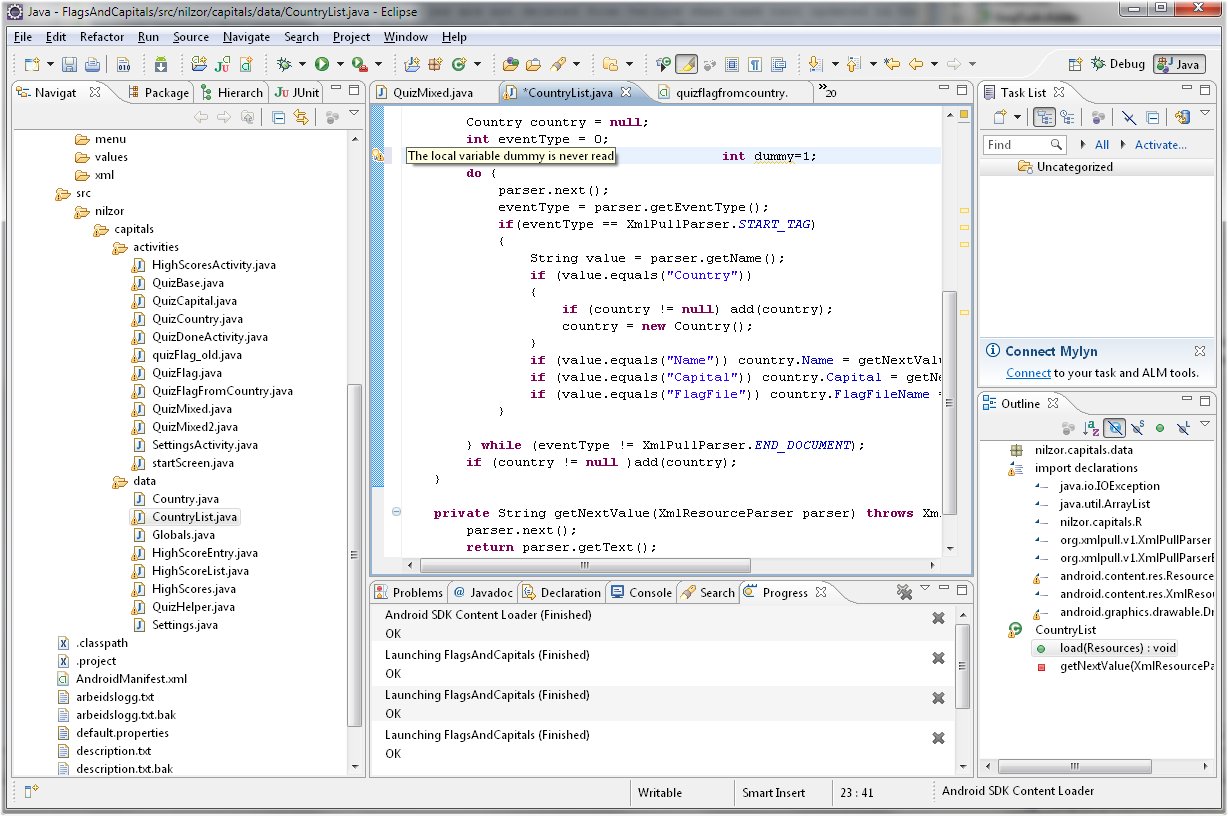 Instant code analysis feedback is good in Eclipse |  Changes you do in the left view instantly results in XAML code change in the rigght, and vice versa. |
Lightweight / fast / responsive | Quick and stable emulator |
Free | Great visual designer |
No visual designer | Huge footprint |
Update 7th Jan: I was noted that the development tools for WP7 are actually also free - the Visual Studio Express and Blend for Windows Phone 7 are free of charge. They can be installed alongside any other preexisting Visual Studio installation.
| The Android emulator | The WP7 emulator |
|---|---|
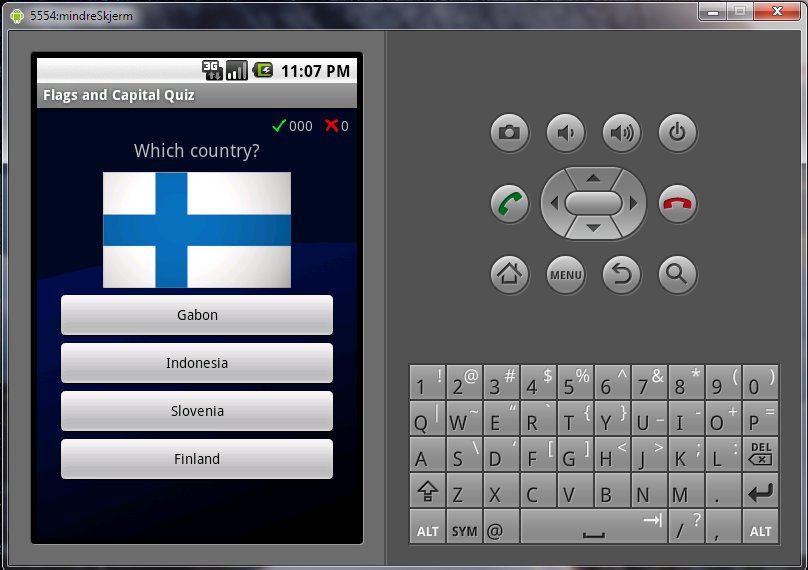 Boots fast, launches programs fast. Solid. Had some problems connecting to the debugger from time to time, but might be a configuration-problem. | 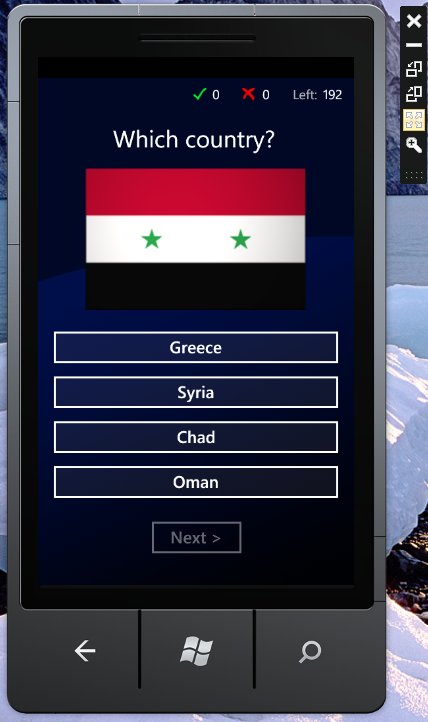 Also solid. The emulators are really not what make the difference. |
The development process and the APIs
In this chapter I will describe the development process session by session on the two platforms, emphasizing the events that stand out as positive or negative. Finally I will summarize what I find good and bad about the frameworks (APIs) that is the Android SDK and the WP7 / Silverlight framework.- For Android I used the Android 1.6 SDK
- Windows Phone 7: Standard WP7 project based on .NET 4.0
- C# is the programming language
- .NET 4.0 is the core libraries (non-UI-functions)
- Silverlight is the SDK which enables rich UI for web, Windows and WP7, but:
- The Windows Phone 7 SDK is a subset of Silverlight and .NET 4.0 - not all functions and UI elements from Silverlight 4 or .NET 4.0 exists on WP7.
Android
| # | Time spent | What |
|---|---|---|
| 1 | 1h 30min | Collected and organized data: Flags, capitals and countries from the CIA World Factbook |
| 2 | 3h 20min | Read basics on Android development, learning Eclipse better Google have documented Android well. Well structured and written. |
| 3 | 4h | Worked on designing and implementing code for my first pages (Activities). Spent time both in XML and in Java code. Wasted a lot of time trying to figure out how to pass parameters with intents. Ended up using global variables instead. Soon got tired of XML-juggling. Little IDE-help here. |
| 4 | 2h 30min | Spent most time trying to figure out how to make buttons turn red and green after an answer had been made. Tried three approaches before finally finding the right answer on the net (Hint: Drawable.setColorFilter()). |
| 5 | 2h 30min | Working on business logic. Three out of five quiz modes complete. |
| 6 | 1h | Mixed mode implemented. |
| 7 | 1h 30min | Settings screen (activity) implemented. Functionality for saving/loading said settings still remain. |
| 8 | 4h | Implemented practice and score mode. Textual "fun" feedback on the results. Half done with high score list functionality Getting problems attaching to the debugger more often. Restarts requried. Annoyed by the fact that hitting F5 when an XML file is in focus, the app is not launched, but instead Eclipse tries to launch XML files in a special manner, effectively forcing me to clean the entire project and rebuild. Wasting some time on this. |
| 9 | 4h | Spent some time drawing icons. High score list implemented. Icon swapping in high score list. The project is starting to show signs of a lot of copy-pasted code in the activities. Probably because of bad design - for instance, Custom components is a conecpt I did not bother to read up on. |
| 10 | 3h 30min | Last mode, flag from country, implementation beugn. Most demanding activity XML. |
| 11 | 3h | Completed flag from country mode. Implemented saving and loading of settings and high scores with JSON serialization. Saving and loading user settings is well supported and easy to use in the Android framework Object serialization in the Java world could have been easier (used for high score object hierarchy). I used standard org.Json-functions. There is a library called Gson that probably could have made my code prettier, but at this point I did not want to introduce additional third-party libraries in my project. |
| 12 | 1h 30min | Completion of diverse functionality |
| 13 | 5h | Some bug-fixing. Fixed memory leak (image data was not freed). Created application icon. Published at Saturday 21th of October.. The publishing process went smooth and was straight forward. |
WP7
| # | Time spent | What |
|---|---|---|
| 1 | 1h 30min | Started designing the pages (Activities on Android). Finding the WP7 documentation pages slightly harder to navigate than the one for Android as I try to read up on Silverlight design concepts. |
| 2 | 1h | Trying to apply databindning. Having worked with databinding on WinForms, doing the same on Silverlight is a step back. You suddenly need to write XAML and learn meta-syntax in quotation marks that I still haven't quite figured out. Copy-paste is your friend. |
| 3 | 3h 30min | Button colouring, flag animation, practice mode and score mode. Note: I did not implement any animation on the Android version, so I'm slightly deviating from the "same app, different platform" concept of my review here, but I couldn't help myself but leverage the animation capabilities of Silverlight. The animation features in Silverlight are awesome. Takes a bit of learning, though. |
| 4 | 1h 30 min | High score logic implemented (no storage) |
| 5 | 1h 30min | More work on the high scores screen. Refactoring pages a bit - creating UserControls for the image buttons used in the high scores view and a control for the score bar in the quiz pages |
| 6 | 3h | Applcation icon included in project. Struggled a bit with getting it to display properly. Turned out it had to have the build action property set to "Content". Save and load of high scores. Support for tombstoning (when app sleeps in background) implemented. The tombstoning concept was a pain in the ass. No such thing on Android, but this is a consequence of the non-multitasking nature of WP7, I guess Object serialization is fortunately a breeze in .NET, which helps when saving object state when tombstoning. |
| 8 | 5h | Refactored all quiz mode pages to user controls. Now mixed mode was implemented in half an hour. Flag from country mode implemented The App Manifest is auto-generated as opposed to on Android. Meaning the compiler among other things auto detects what kind of hardware resource your application will be utilizing. VS2010/XAML editing lacks good support for refactor-renaming things like animation timeline names |
| 9 | 1h | Improved some animation (half hour) and added support for trial mode, which is a feature unique to the Microsoft Marketplace. You may actually provide the user with an option to try before they buy the software, all which is controlled with a single boolean in your code. Simple and effective! The IsTrial boolean is brilliant |
| 10 | 0h 30min | Submitted at the 20th of November. Read more about submission process below |
Summary
- Total time on Android: 35 hours 30 minutes
- Total time on WP7: 18 hours
These numbers lie
There are several reasons the WP7-development went faster.
- I had the resource files ready (flags and data xml's)
- I could reuse architectural principles i used in the Android project (brain time)
- I reused actual code by copy-pasting and changing "boolean" into "bool" etc. (code time)
In any case, I did a breakdown on the numbers, dividing time spent into five categories: Gathering and prepare resources (images, dat), Studying (googling and reading), Coding (actual C# or Java work), UI-develpoment (XML/XAML) and publishing. You do need to take these numbers with a grain of salt. It's very difficult to say exact how much time I spent on each activity, but I think it gives an indication. Instead of presenting the numbers in a table, I made these beautiful pie charts:
| Android | WP7 | |
|---|---|---|
 |  |  |
The most interesting fact I get out of these pie charts is the difference in time spent doing "UI". Now this may be a question of definition, but I did spend proprtionally more time working in the designer and with XAML than with code on WP7 compared to Android. Maybe it's because Silverlight more fun, so I took time to work on things like animation and stuff? Maybe it's because I knew better what to code, so that the business logic was done faster the second time around? Probably a combination.
The submission process
The sumbission process are pretty similar. I suppose Google and Microsoft have learned from each other and copied some ideas. The basic info you need to fill out and upload on both places are:
- Name
- Description
- Binaries
- Icon, screenshots and artwork
- Pricing details
- The android platform requires you to enter a content rating (Teen/Mature, etc)
- The WP Marketplace allows you to price the product differently in different countries.
- Android allows advanced copy protection with a licensing server. Takes some implementing. Unsure where WP7 stands here.
- WP7 allows support for trial mode
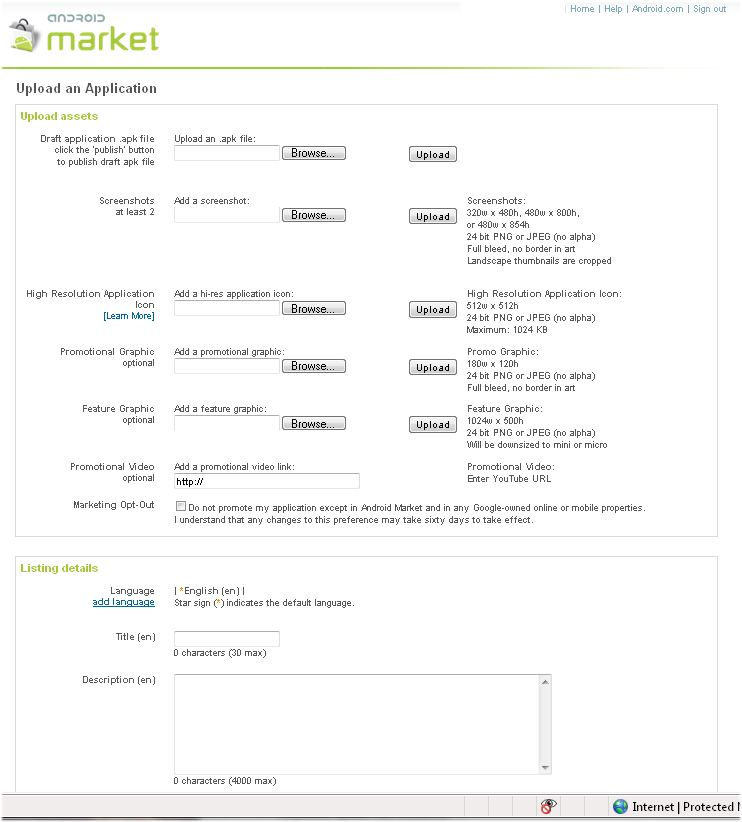 About half of the Android app submission form |
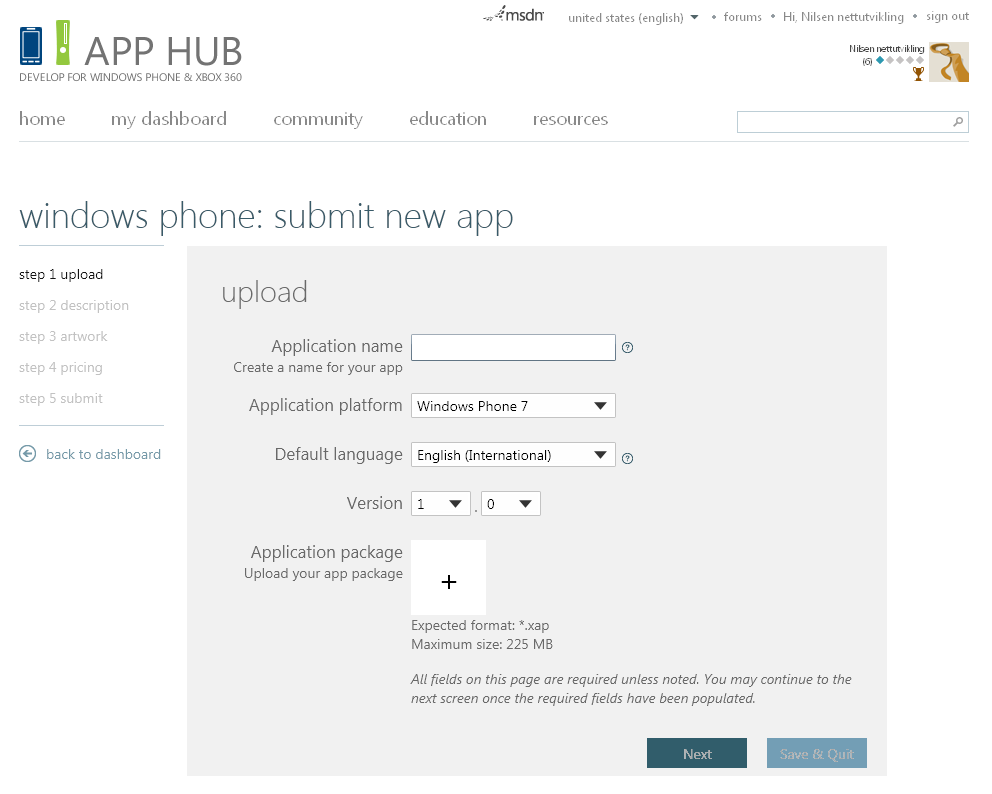 Page one of five in the WP7 submission process |
The report interfaces
When your app is published, it's time to kick back and watch the money flow in. Also here, the interfaces are good on both platforms, but I'd give Google a minor win. Google reports every single purchase with full name, date and country of the buyer, while Microsoft settles for a summary per country. Microsoft gives you a sleek graph, though - that's cool. Another thing that is a big plus for Google is the error report interface. You can actually see each single exception that occur runtime on any single phone in the world - with full stacktrace. There is no such thing at Microsoft's platform.Since pictures says more than a thousand words:
Android Market Publish Site
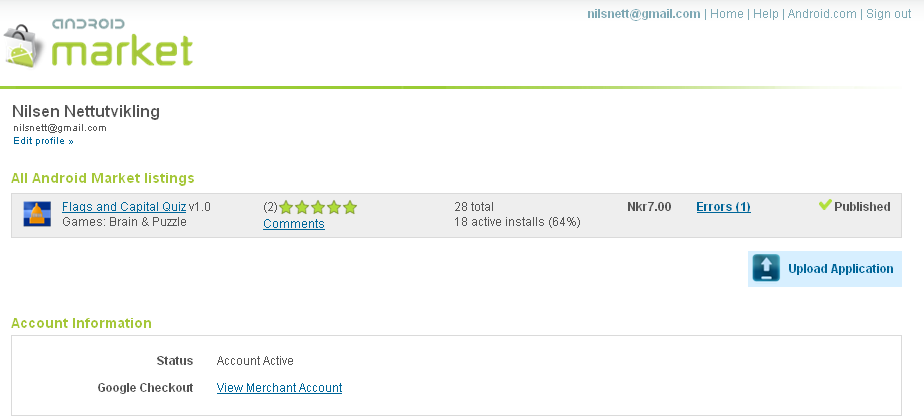 | 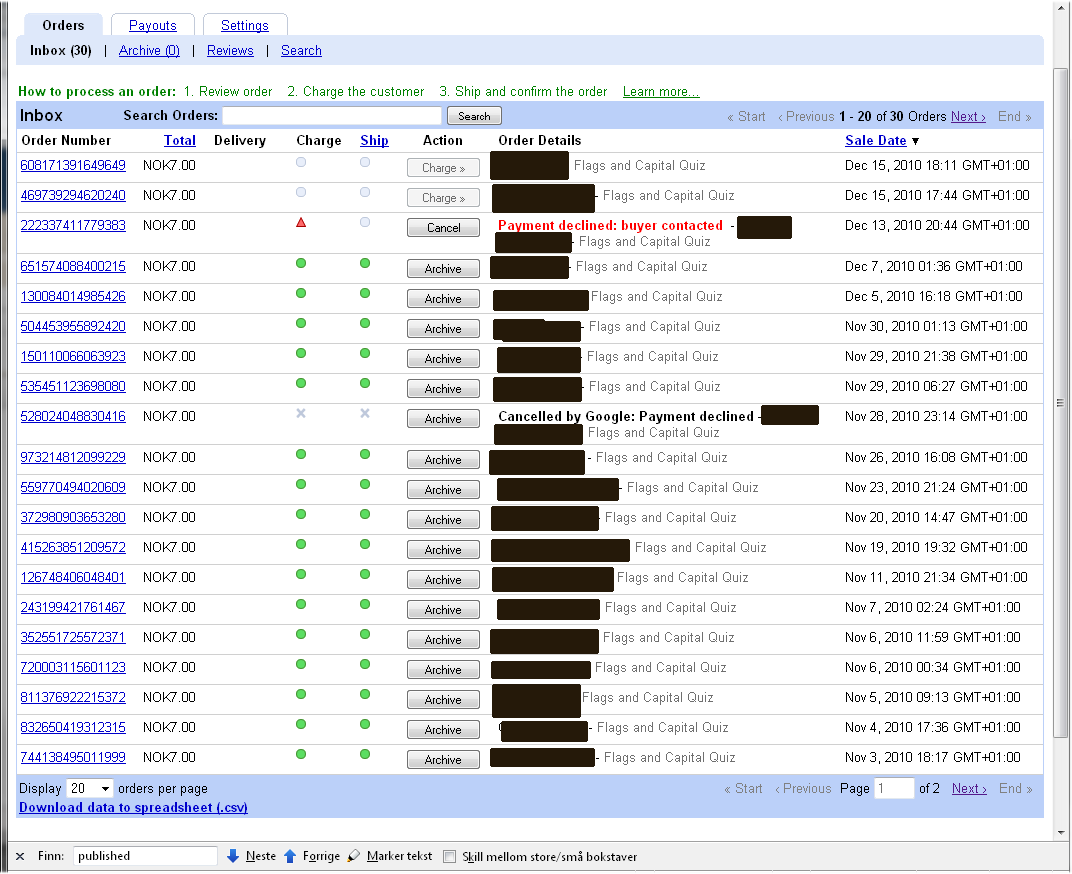 |  | 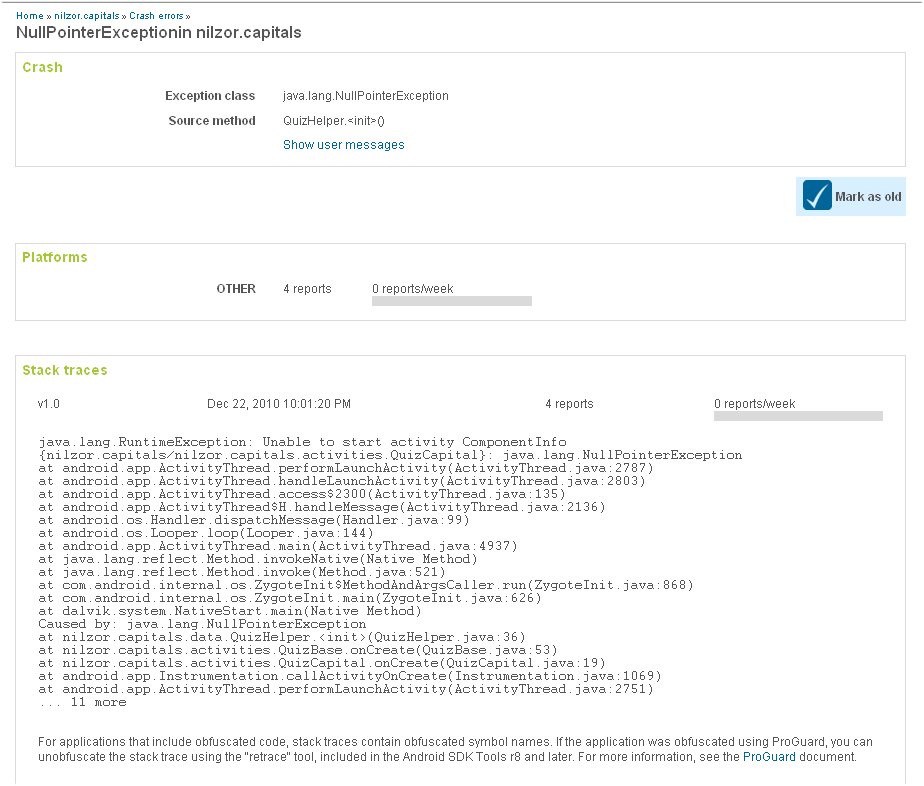 |
Android Market main page | Detailed Sales Report | Android Market Error Report page | Android Market Error Details. Luckily I added a bug just so that I could demonstrate this feature for you! |
Windows Phone App Hub
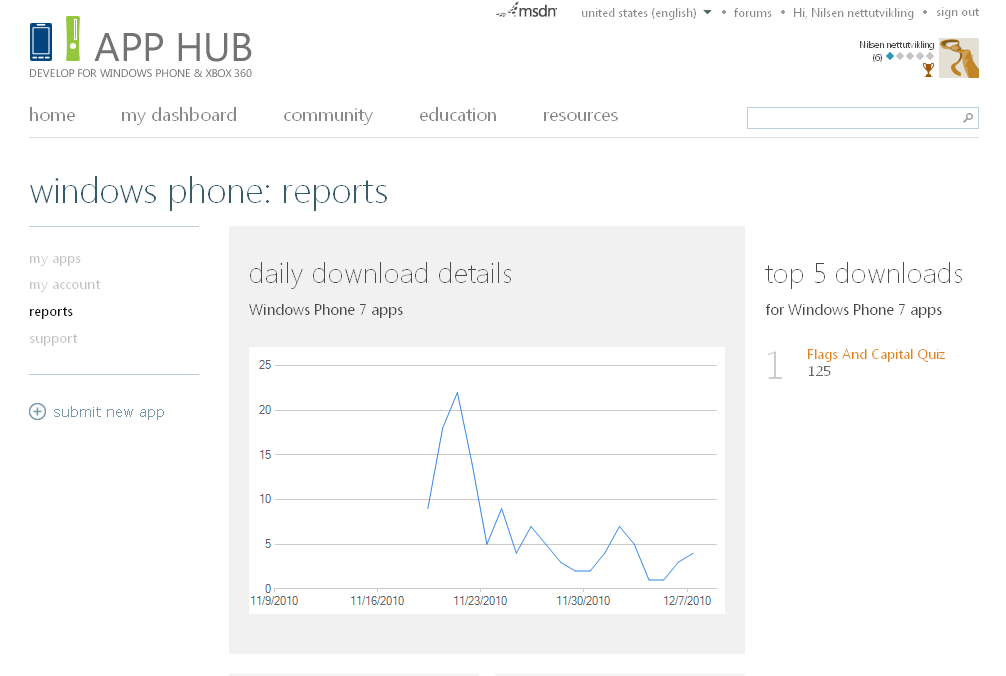 | 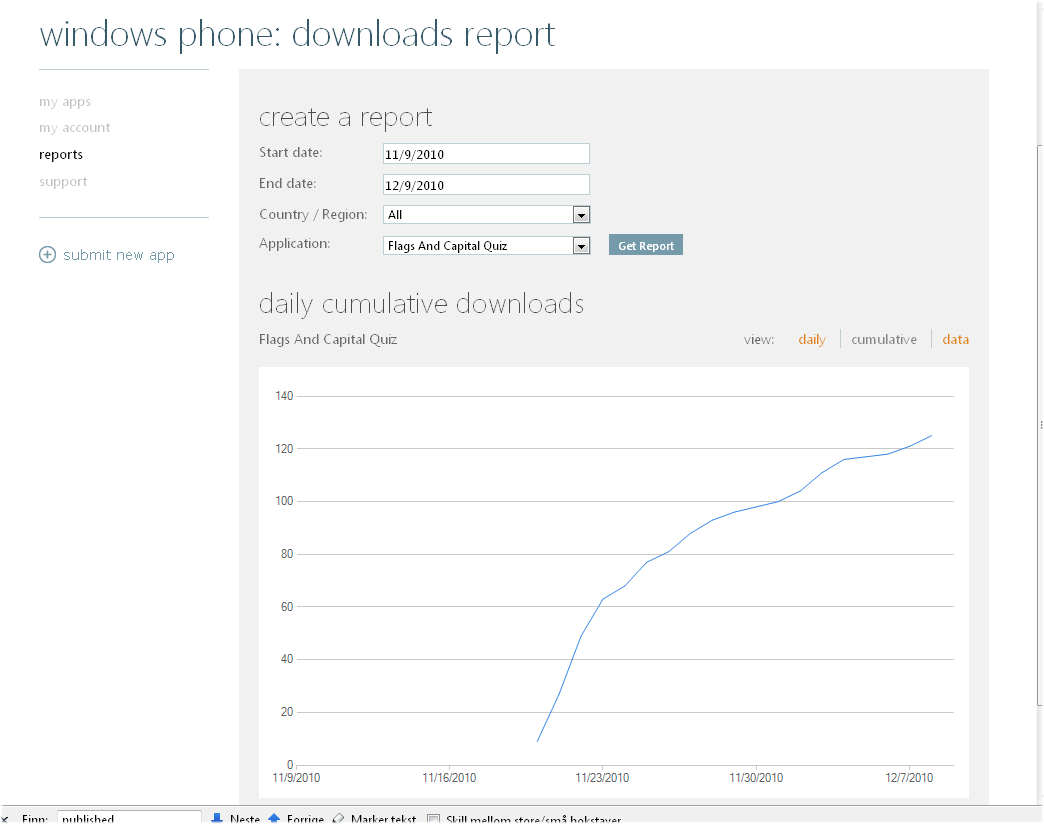 |  |
Daily download details | Daily cumulative | Data summary table per country |
Sales numbers
Finally some numbers. After each application had been on the market for a month, I gathered the numbered and these are the results:| Android | WP7 | |
|---|---|---|
| Trial | N/A | 125 |
| Full version | 15 | 36 |
Both were priced at $1.
Now I think there are several reasons why I sold better at the WP7-platform. For one there is less competition there. I could not see any other apps at the time of publishing that had this kind of flag quiz. On Android there were three or four pretty similar. For free. I'm surprised I actually sold any at all.
Summary
So I'm not going to be rich on this application, but it's been a fun project. Before I leave the sales figures: I have plans to release a new version on Android (and maybe also WP7) that will be ad-based and free instead of priced at $1. I suspect I'll compete better with the other free application then, but will I make more money? It will be an interesting experiment as well, and I'll probably post a new blog entry about the results in a couple of months.But who wins? Where will I go? I do believe it's slightly more fun to work at the WP7 platform, but the differences are not that big. Not big enough to be decisive alone. I do own a vey cool Android-based Samsung Galaxy S phone now, which is a factor that makes me want to develop for Android. I do have a WP7-device as well (on loan from Microsoft), but I actually think the Android device is slightly cooler to use and play with.
Then there is the user base, which I talked about in the introduction. The user base for Android is still quite much bigger than for Windows Phone, and that is the factor that makes me pretty sure that my next project will be on an Android device. I reach a greater audience, and that's always cool both in terms of revenue and feedback. Who want's to work for weeks in a cellar and when the day comes for publishing, you never hear a word of praise or criticism? So the next project: Android, but the next after that? Who knows - I go where the wind blows.
Dice roll comparison chart:
| Aspect | Android | WP7 |
|---|---|---|
| IDEs | 4 | 6 |
| APIs | 4 | 5 |
| Availability of documentation | 6 | 5 |
| Reporting functionality | 5 | 4 |
| Submission process | 5 | 5 |
| Perceived market potential | 5 | 4 |
| Total | 29 | 29 |
It's a draw! -Everybody is happy and I'm avoiding Microsoft vs Google, Closed vs Open source-debates in the comments - perfect! :-)
Happy app developing!

